Fact-checked by the The Credit Scout editorial team
Quick Answer
To find and cancel unused subscriptions, audit your bank and credit card statements, use a subscription tracking app like Rocket Money or Trim, then cancel each service directly through its account settings or your device’s app store. Most people discover 2–4 forgotten subscriptions averaging $219 per year in wasted spending. As of July 2025, new FTC rules make cancellation easier than ever.
Finding and canceling unused subscriptions is one of the fastest ways to recover lost money from your budget. The average American spends $91 per month on subscription services according to Forbes Advisor’s subscription spending research, yet consistently underestimates that figure by nearly half. Tackling unused subscriptions can free up real money without requiring any sacrifice in lifestyle.
Timing matters more now than it did even a year ago. The FTC’s “Click-to-Cancel” rule, which took effect in May 2025, legally requires companies to make cancellation as easy as signup, meaning the industry has fewer tricks to trap you. The subscription economy itself has exploded, with services now covering everything from streaming and software to snack boxes and car washes, making accidental charges easier to accumulate than ever before.
This guide is for anyone who suspects money is quietly draining from their accounts every month. By following the steps below, you will know exactly what you are paying for, have tools to track it going forward, and be equipped to cancel anything that no longer serves you.
Key Takeaways
- The average American spends $91 per month on subscriptions but believes they spend only $46, according to Forbes Advisor.
- Subscription tracking apps like Rocket Money have helped users identify and cancel an average of $720 in unused subscriptions per year, per Rocket Money’s reported user data.
- The FTC’s Click-to-Cancel rule, effective May 14, 2025, requires businesses to provide a simple online cancellation method, eliminating many common cancellation barriers per the FTC.
- Streaming services alone account for an average of 4.5 active subscriptions per household, with many duplicating content libraries, according to Statista’s 2024 streaming data.
- Unused gym memberships cost Americans collectively more than $1.8 billion per year in wasted fees, per Statista fitness spending data.
- Disputing an unauthorized recurring charge with your credit card company results in a full refund in more than 85% of cases, according to the Consumer Financial Protection Bureau (CFPB).
In This Guide
- How do I find all the subscriptions I am currently paying for?
- How do I decide which subscriptions to cancel vs. keep?
- How do I actually cancel a subscription that is hard to get out of?
- How do I stop future unwanted subscription charges before they start?
- What is the best app or method to track my subscriptions going forward?
- Frequently Asked Questions
Step 1: How Do I Find All the Subscriptions I Am Currently Paying For?
Reviewing 12 months of bank and credit card statements line by line is the most reliable way to surface every active subscription. Annual charges are among the most common forgotten expenses, and a full-year lookback is the only way to catch them.
How to Do This
Log in to every checking account, savings account, and credit card you use, including accounts held at Chase, SoFi, or any credit union. Download or view statements going back a full 12 months. Look for any recurring charge: weekly, monthly, quarterly, or annual. Flag every transaction that repeats at a consistent interval or from a company name you do not immediately recognize.
Pay special attention to charges under $15. Many subscription companies deliberately price services low enough that customers overlook them on statements. A $4.99 charge from “ADOBE*ACROBAT” or a $9.99 debit from “SIRIUSXM*STREAMING” can sit unnoticed for years. Our guide on money management mistakes millennials keep making identifies forgotten recurring charges as one of the top five wealth-eroding habits.
What to Watch Out For
Free trials that converted to paid plans are notoriously easy to miss. Companies often change the billing name slightly between the trial and the paid phase. If you see a charge from an unfamiliar name, search that exact string in Google, it will almost always reveal the parent company.
A 2024 Forbes Advisor survey found that 42% of consumers are paying for at least one subscription they forgot they signed up for. The majority of those forgotten charges have been active for more than six months.
Also check your PayPal, Apple Pay, and Google Pay accounts. Many app subscriptions bill through these wallets rather than directly to your bank, making them invisible in a standard statement review. Experian’s credit monitoring tools can sometimes surface recurring merchant charges as well, which is a useful secondary check if you already have an account.

Step 2: How Do I Decide Which Subscriptions to Cancel vs. Keep?
Cancel any subscription you have not actively used in the past 30 days, unless it provides clear financial or legal protection (like insurance or security software). For everything else, apply a simple value-per-use test.
How to Do This
Create a list with three columns: the service name, the monthly cost, and how many times you used it in the last 30 days. Divide the cost by the number of uses. If a $15-per-month streaming service was used twice, you paid $7.50 per session, that may be worth it. Zero uses means it belongs on the cancel list.
Group your subscriptions into four categories to speed up the decision:
- Essential: Security software, cloud backup, identity theft protection
- Active entertainment: Streaming services you use weekly
- Occasional use: Services used once or twice a month, consider pausing instead of canceling
- Dormant: Services not used in 30+ days, cancel these immediately
If you are also working to pay down debt, redirecting even $50 per month in canceled subscriptions toward a high-interest balance makes a measurable difference. Your debt-to-income ratio (DTI), a figure lenders use to assess creditworthiness alongside your FICO Score, improves when fixed monthly outflows drop. Read our guide on whether to pay off debt first or build an emergency fund to see how even small monthly savings reshape your financial timeline.
What to Watch Out For
Beware of the “someday I’ll use it” trap. If you have been telling yourself you will use a service for more than three months and have not, the psychological barrier is not going away. Cancel it. You can always re-subscribe, most companies offer the same or better introductory pricing to returning customers.
Before canceling a service you occasionally use, call or chat with customer support and ask for a pause or reduced rate. Major streaming platforms like Hulu and Paramount+ and services like SiriusXM regularly offer 1–3 months free to customers who threaten to cancel.
| Subscription Type | Average Monthly Cost | % of Users Who Are Inactive | Recommended Action |
|---|---|---|---|
| Streaming Video | $13–$18 per service | 31% | Cancel duplicates; keep 1–2 core services |
| Gym Membership | $40–$60 | 67% | Cancel if unused 30+ days; try pay-per-class |
| Music Streaming | $10–$11 | 18% | Switch to free tier or share a family plan |
| Subscription Boxes | $25–$45 | 48% | Cancel; one-time purchases are usually cheaper |
| Cloud Storage | $3–$10 | 22% | Consolidate to one provider; downgrade tier |
| Software / Productivity | $10–$30 | 35% | Audit annually; switch to free alternatives |
| News / Magazine | $5–$20 | 52% | Cancel; check if local library provides free access |
Step 3: How Do I Actually Cancel a Subscription That Is Hard to Get Out Of?
To cancel a stubborn subscription, go directly to the company’s account settings page and look for “Billing,” “Membership,” or “Subscription.” The FTC’s Click-to-Cancel rule now legally requires companies to provide a simple online cancellation path. If you cannot find it, use the cancellation methods below in order of speed.
How to Do This
Follow this escalating approach for each subscription on your cancel list:
- Account settings first: Log in and navigate to Billing or Membership. Look for “Cancel,” “End Subscription,” or “Turn Off Auto-Renew.”
- App store cancellation: If you signed up through an iPhone, go to Settings > Apple ID > Subscriptions. On Android, open the Google Play Store > Subscriptions. Canceling here stops billing at the source.
- Chat or call: If no online cancellation exists, use the company’s live chat. Keep the conversation text-based so you have a written record.
- Email with written confirmation: Send a cancellation request in writing and ask for a confirmation email. Save this email permanently.
- Credit card dispute: If the company ignores your request and charges you again, contact your credit card issuer and dispute the charge as unauthorized. The CFPB supports your right to dispute unauthorized recurring charges.
Consumers often underestimate the power they hold over recurring charges. Your credit card company is legally required to investigate disputes, and in most cases sides with the cardholder when a recurring charge was not clearly authorized or when cancellation was made unreasonably difficult, according to CFPB billing dispute guidance.
What to Watch Out For
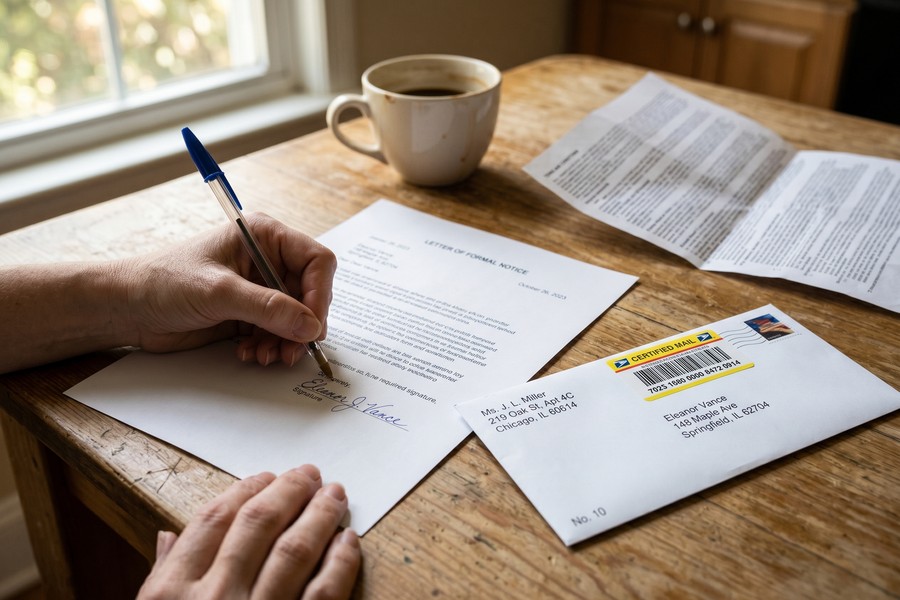
Some companies, particularly gym chains and magazine publishers, require cancellation in writing via certified mail. Check the original terms of service before assuming you can cancel online. Planet Fitness, Anytime Fitness, and several local gym chains still require this physical step in certain states.
Also watch for “pause” offers designed to prevent cancellation. If you truly do not plan to use the service in the next 90 days, decline the pause and complete the full cancellation. A pause still results in charges resuming automatically.
Annual subscriptions often do not refund the unused portion when you cancel mid-cycle. Cancel these at the very end of your billing period, not at the moment you decide to stop, to extract the maximum remaining value before the account closes.
Step 4: How Do I Stop Future Unwanted Subscription Charges Before They Start?
Using a virtual credit card number for any free trial signup is the single most effective way to prevent unwanted future charges. Virtual cards give companies a one-time or merchant-specific number that can be disabled instantly, cutting off future billing without involving your real card.
How to Do This
Several tools make this easy at no cost:
- Privacy.com: Creates virtual card numbers with customizable spending limits. Set a $1 limit for a free trial, and any charge above that is automatically declined.
- Apple Card: Generates unique card numbers per merchant through Apple Wallet.
- Capital One Eno: Built-in virtual card generator for Capital One cardholders, accessible through the browser extension.
Beyond virtual cards, set a recurring calendar reminder for two days before any free trial ends. Most trials send a reminder email 24 hours before they charge, but by then, canceling within the same day can be stressful. A 48-hour buffer gives you time to evaluate and act without rushing.
What to Watch Out For
Virtual card numbers can occasionally cause issues with subscriptions that require consistent billing data for account verification. In those cases, use a dedicated physical card solely for subscriptions, one that you review monthly. This isolation strategy mirrors the budgeting discipline covered in our comparison of cash envelope vs. zero-based budgeting, where assigning every dollar a purpose prevents financial leakage.
Under the FTC’s Restore Online Shoppers’ Confidence Act (ROSCA), companies are legally prohibited from charging you for a negative option subscription, one where silence means enrollment, without your explicit informed consent. If a company signed you up automatically without clear disclosure, you can report it to the FTC’s fraud reporting portal.
Step 5: What Is the Best App or Method to Track My Subscriptions Going Forward?
For automated tracking, Rocket Money and Copilot are the strongest options available. Both scan your connected accounts and categorize every recurring charge automatically, and both send alerts when new subscriptions are detected or when existing ones change price.
How to Do This
Choose a tracking method based on your preference for automation versus manual control:
- Rocket Money (formerly Truebill): Connects directly to your bank accounts, identifies subscriptions automatically, and can negotiate or cancel them on your behalf. Free tier available; premium starts at $4/month.
- Copilot: A premium budgeting app ($13.99/month or $99/year) with excellent subscription tracking and spending insights. iOS only.
- Trim: Free service that analyzes spending and flags subscriptions. Also offers bill negotiation.
- Manual spreadsheet method: A Google Sheets or Excel tracker with columns for service name, cost, billing date, and last-used date. Low-tech but completely private, no account linking required.
- Built-in iPhone feature: Go to Settings > Apple ID > Subscriptions to see all App Store subscriptions in one place. Android users can find the same in the Google Play Store under Subscriptions.
Freelancers and self-employed individuals who manage both personal and business subscriptions need to keep them rigorously separated, both for tracking and for tax purposes. Our guide on the best budgeting apps for freelancers covers tools that handle mixed-income situations well.
What to Watch Out For
Subscription tracking apps require read access to your bank accounts. Reputable apps use bank-level encryption, but there is a real privacy tradeoff worth acknowledging. If you are uncomfortable sharing account access, the manual spreadsheet or the built-in Apple/Google tools are fully effective alternatives without any data sharing. That is not a minor caveat: anyone who has consolidated all their financial data into a single third-party app knows the discomfort of a data breach notification. Choose based on your actual risk tolerance, not just convenience.
Connecting subscription tracking to a broader budgeting system amplifies the benefit. If you are building credit or recovering from past financial setbacks, reducing fixed monthly outflows directly improves your DTI ratio. That ratio matters in lending decisions, as explored in our coverage of credit building mistakes that are quietly hurting your score. A lower DTI can also affect the APR you receive on new credit products.
“The single most impactful habit shift I see in clients who successfully reduce wasteful spending is moving from reactive to proactive subscription management. Checking your subscriptions quarterly — not just when something looks wrong on a statement — is the difference between recovering $50 and never losing it in the first place.”

Schedule a 15-minute “subscription audit” on the first Sunday of every quarter. Set a recurring calendar event and review your tracking list or app dashboard. This single habit prevents dormant charges from accumulating and keeps your cancel routine on autopilot.
Frequently Asked Questions
How do I find subscriptions I forgot about that are charging my bank account?
Start by reviewing 12 months of bank and credit card statements and flagging any charge that appears more than once at a regular interval. Look for amounts under $20, which are the most commonly overlooked. Free tools like Rocket Money or Trim automatically scan your connected accounts and surface recurring charges within minutes of setup.
Can I get a refund for a subscription I forgot to cancel?
You may be able to get a full or partial refund, especially if you cancel within a short window after being charged. Contact the company’s customer support directly and explain the situation, many will issue at least one courtesy refund. If the charge was unauthorized or the company made cancellation unreasonably difficult, you can dispute it with your credit card issuer under CFPB billing dispute protections.
What happens to my data when I cancel a subscription service?
Most subscription companies retain your account data for 30 to 90 days after cancellation to allow for reactivation. After that window, submit a formal data deletion request under your state’s privacy laws (CCPA in California, for example) or the company’s own privacy policy. Always request a confirmation email when canceling, and send a separate data deletion request if privacy is a concern.
Is it worth paying for a subscription cancellation service?
For multiple hard-to-cancel subscriptions or situations where you want someone to negotiate on your behalf, services like Rocket Money Premium can justify their cost. For straightforward platforms like streaming services, you can cancel directly and skip the service fee entirely. The FTC’s Click-to-Cancel rule has made direct cancellation significantly easier since May 2025.
How do I cancel a subscription that has no cancel button on its website?
Try canceling through your app store first (Apple or Google Play), then contact the company via live chat or phone and request written confirmation. If the company still charges you afterward, dispute the charge with your bank or credit card issuer as unauthorized. The FTC’s rules now prohibit companies from making cancellation harder than signup, so persistent obstruction is itself a reportable violation.
Should I cancel subscriptions or pause them to save money?
Cancel any subscription you have not used in 30 days or more. Pausing still results in automatic charges resuming, and the intention to use a dormant service rarely materializes. The one exception is a genuinely seasonal service you actively use at specific times of year, like a ski resort app in winter. For anything truly dormant, act immediately rather than deferring the decision.
How do I stop a subscription that keeps charging me after I canceled?
Your strongest tool is a credit card chargeback. Contact your card issuer, provide proof of cancellation (the confirmation email), and request a dispute. The issuer will typically reverse the charge and block future ones. You can also request a new card number to completely cut off the merchant’s access to your billing information. Report persistent unauthorized charges to the FTC’s fraud reporting system.
What subscriptions do most people forget they are paying for?
Annual charges are forgotten far more often than monthly ones because of the long gap between billing dates. Commonly overlooked subscriptions include Microsoft 365 and Adobe Creative Cloud add-ons, domain registrations, antivirus software set to auto-renew, Amazon Prime, subscription boxes, gym memberships, and premium tiers of apps like LinkedIn, Duolingo, or Calm. A dedicated subscription audit once a year catches the majority of these.
Does canceling subscriptions affect my credit score or FICO Score?
Canceling a subscription service does not directly affect your FICO Score, because most subscription companies do not report payment history to Experian, Equifax, or TransUnion. However, if a subscription went to collections because you missed payments, that collection account could appear on your credit report and lower your score. Staying current on recurring charges prevents accounts from accidentally lapsing into debt. For context on how different financial actions affect your score, see our guide on DIY credit repair strategies.
How much money can I realistically save by canceling unused subscriptions?
Most people who conduct a thorough subscription audit recover between $50 and $150 per month, depending on how many dormant services they have accumulated. Annually, that is $600 to $1,800 returned to your budget from zero additional income. Users of Rocket Money report average savings of $720 per year after their first full audit, according to Rocket Money’s published data. Redirecting that money toward an emergency fund or debt payoff compounds the benefit significantly, as outlined in our guide on building a six-month emergency fund on a single income.
Can my bank help me identify and block unwanted subscription charges?
Several major banks, including Chase, now offer built-in tools to flag recurring charges directly in your account dashboard. Some issuers allow you to block specific merchants from future charges without disputing an existing transaction. Capital One’s Eno browser extension, for example, goes further by generating virtual card numbers to isolate merchants from the start. If your bank does not offer these features, a third-party app like Rocket Money or Trim fills the gap effectively.